WP-ImmoMakler 5.62.0 – Cancel Button, New Gallery, and More

With version 5.62.0, WP-ImmoMakler introduces an important legal update: the "Cancel" button for real estate agents. It also includes a new Gutenberg block for real estate galleries, as well as several practical improvements related to importing, image galleries, and detail views.


Cancel Button for Real Estate Agents

Effective immediately, the cancellation button required by law for real estate agents is now integrated directly into WP-ImmoMakler. Consumers can use it to conveniently cancel their brokerage agreement online—either via a dedicated cancellation page or directly in an overlay window. After submitting the cancellation, they automatically receive a confirmation via email, and you are notified at the same time.

Einrichten lässt sich der Widerrufsbutton unter WP-ImmoMakler → Einstellungen → Widerrufsbutton – dort stellen Sie Empfänger, Texte, Button-Farbe und Pflichtfelder ein. Der Button und das Formular sind als Shortcodes ([immomakler-widerruf-button] und [immomakler-widerruf-form]) sowie als Elemente in Gutenberg, Elementor, Divi, WPBakery, Bricks und Oxygen verfügbar.

⚠️ Rechtlicher Hinweis: WP-ImmoMakler stellt den technischen Mechanismus und sinnvolle deutsche Standardtexte für den Widerrufsbutton für Immobilienmakler bereit. Ob und in welcher Form Sie einen Widerrufsbutton anbieten müssen sowie die konkrete Beschriftung und Belehrung, lassen Sie bitte durch Ihre Rechtsberatung prüfen.

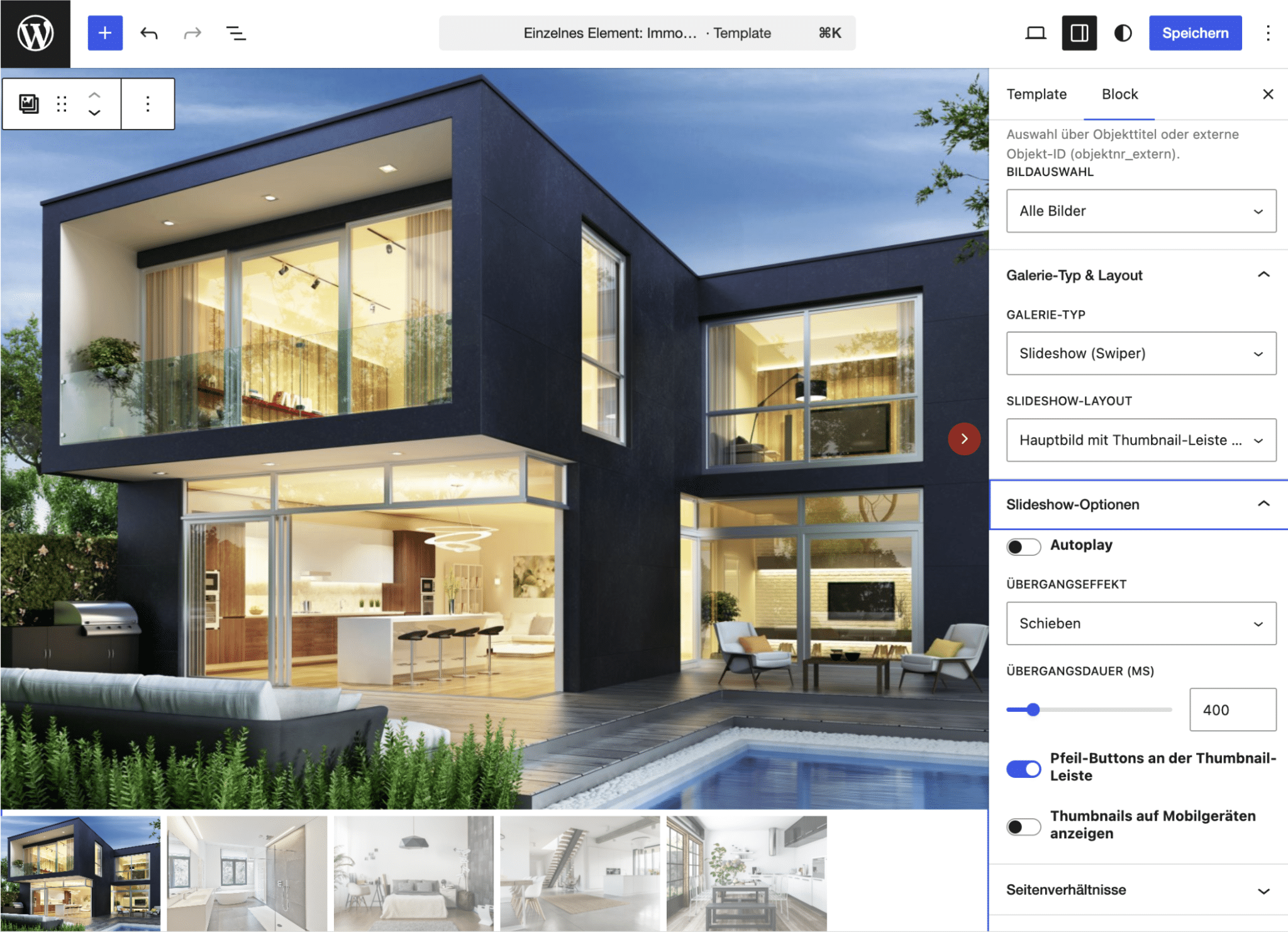
 

New Gutenberg Block: Real Estate Gallery

Until now, the image gallery was tied exclusively to a property’s detail view. With the new block, you’ll be able to embed the gallery as a standalone element on any page—and do so multiple times with different settings. Each instance can be individually configured: layout, aspect ratios, image sizes, spacing, corner rounding, and button colors. You can easily select the desired property using the search field, either by property title or by external property ID.

WP-ImmoMakler Demo Image: New Gutenberg Block—Real Estate Gallery

Improvements

In the Customizer, you'll find new options for customizing the colors, corner radius, and shadows of the data boxes. You can find these options in the Customizer under WP-ImmoMakler → Detail View. Feel free to experiment with these settings—if you don't like the changes, just don't save them.

  • Three new options are now available: Locations can be grouped by federal state; locations outside the main country are automatically assigned to the respective country; and for Austrian properties, the Vienna district can be automatically determined based on the ZIP code. All three options are disabled by default and can be enabled under WP-ImmoMakler → Settings → Import.


  • The spacing between images is now divided into two parts: There are separate settings for the spacing between thumbnails (default 6px) and between main images (default 0px for borderless transitions). In addition, the detail view gallery can now choose to display all images, only floor plans, or all images without floor plans. For the static layout with horizontal thumbnails, the “Show All Images” button is now also supported. You can find the settings in the Customizer under WP-ImmoMakler → Image Gallery.


  • In the future, the QR code in the footer will only be displayed if the property is public and has been published. The default font (Roboto) is now consistently used for titles, headings, and footers if no valid font has been specified.
  • The display period for the graphical EnEV 2014 chart has been extended through June 1, 2026. Since the legal framework for the new energy performance certificate scale in Germany has not yet been finalized, the previous chart will continue to be displayed for energy performance certificates issued on or before May 31, 2026.
  • Neue Customizer-Option: Das Kontaktformular kann bei reservierten Objekten nun gezielt ausgeblendet werden. Die Option ist standardmäßig deaktiviert und lässt sich unter WP-ImmoMakler → Immobilien Detailansicht aktivieren.


  • Der Tab “KI-Funktionen” unter WP-ImmoMakler → Einstellungen → Integrationen zeigt jetzt einen Status-Indikator – ein grünes Häkchen wenn alles korrekt eingerichtet ist, oder einen roten Hinweis wenn etwas fehlt. Sind die KI-Funktionen aktiviert aber noch kein Anbieter verbunden, erscheint direkt im Tab ein Hinweis mit Link zur Anbindung.
  • Form fields can now also be mapped to the XML node “property → description”—which is useful, for example, for transferring the property preferences selected by the prospective buyer. Values from multiple-choice or checkbox fields are transmitted separated by commas, and on a property detail page, the selected information is appended directly to the property title.
  • For more information on the WPForms integration, please see our documentation.


  • International phone numbers at the beginning of a line (e.g., “+43 (0) 664 123 45 67”) were previously mistakenly recognized as bullet points, and the leading “+” was removed. Such lines are now correctly preserved as normal paragraphs. In addition, the automatic linking feature for international numbers now generates a correct tel:-Link including the country code.


Note on the Update

To be able to download the update in your WordPress backend, you need an active support license. This is included in your plugin license for the first twelve months after purchase. After the first twelve months, we offer you our service package so that you can continue to benefit from support and updates.

⚠️ The update must be installed manually. Please remember to have the cancellation button reviewed by legal counsel before going live.


Subscribe to our newsletter

Keep up to date with all improvements and further developments with our newsletter.