WP-ImmoMakler for Bricks Builder – Showcasing Your Properties to Their Best Advantage

Elements, Dynamic Tags, and Conditions—three levels of integration for maximum design flexibility

Create professional real estate websites directly in Bricks Builder—with custom-developed elements, dynamic placeholders for real estate data, and smart visibility rules. No code, full control.

100% Bricks-native
Custom elements instead of shortcode workarounds

3 Integration Level
Elements + Dynamic Tags + Conditions

10 Real Estate Elements
From the list view to the contact form

No code required
Visual design in the Bricks Editor

Bricks Elements for Real Estate

Each element appears directly in the Bricks Builder panel and can be placed using drag-and-drop—with customizable settings for layout, typography, and colors.

List View (Complete)

Your entire real estate portfolio on a single page—with search filters, a map, and page navigation. Visitors can find the right property in seconds.

Object data

All real estate data is clearly presented in a data list. You decide which fields are visible and can customize column widths, spacing, and borders.

Picture gallery

High-quality real estate photos in an interactive gallery with a lightbox. You can easily configure the settings using the WordPress Customizer.

Contact form

Prospective buyers can submit their inquiries directly from the property listing—with automatic assignment to the property. No lost leads.

Results List

The list of properties without a search form—ideal if you want to place the search function separately or create your own filters using Bricks' built-in tools.

Energy certificate

All energy metrics at a glance—automatically adjusted to meet the requirements in Germany, Austria, Spain, and Italy.

Area map

Google Maps shows the property's location. Prospective buyers can immediately see the location, amenities, and neighborhood.

Detailed View (Complete)

The complete property listing at a glance: photos, details, description, map, and contact information—ready to use right away and professionally designed.

Features and Specifications

Features presented as a clear list of icons—with customizable icons, colors, and a flexible layout (vertical or horizontal).

Videos

Embedded real estate videos from YouTube, Vimeo, or other platforms—right in the property listing—to give a vivid impression of the property.

Dynamic Tags – Use Real Estate Data Anywhere

With WP-ImmoMakler's Dynamic Tags, you can insert real estate data into any Bricks element—headings, text fields, images, and more. This allows you to create completely custom layouts without having to rely on pre-designed elements.


Descriptions Insert property descriptions, amenities, location details, other information, or brief descriptions as dynamic content into any text element—with automatic formatting and link conversion.


Individual Values Every data field for your property—living area, number of rooms, purchase price, and more—can be used as a dynamic placeholder in a Bricks heading, a text box, or even a button.

Multilingual Labels
The correct field label in your website's language—automatically generated from WP-ImmoMakler translations. Perfect for bilingual or international real estate agent websites.


Real Estate Photos Dynamically embed all photos, floor plans only, or regular images only into Bricks gallery or image elements—sorted in the order you specified in WP-ImmoMakler.

Conditions – Smart Visibility for Your Layouts

With WP-ImmoMakler's Bricks Conditions, you can automatically show or hide elements—depending on the data available for a property. No empty placeholders, no unnecessary sections.

Are descriptions available? Display a text section only if the corresponding description has actually been entered—whether it's an object description, location description, or amenities list.

Is there a PDF available?
A download button for the property description PDF will only appear if a PDF for the property has actually been uploaded.

Taxonomy Conditions
Show or hide specific content—by property type, marketing type, status, location, country, use type, or feature. For example, display a “Tenant Tips” module only for rental properties, or country-specific notes only for certain countries.

Here's how real estate brokers and agencies use WP-ImmoMakler with Bricks

Customized Property Listing Page with Dynamic Tags

Instead of relying on a pre-designed layout, you can build your property listing page completely from scratch: the property title as a Bricks heading, the purchase price in a stylized badge, living area and number of rooms as a row of icons—all controlled via Dynamic Tags. You can also include a photo gallery, map, and contact form as elements. Using Conditions, you can hide the energy performance certificate unless data is available.

WP Real Estate Agent bricks single scaled
WP-Real Estate Agent bricks archive scaled.jpg

Clear and Organized Real Estate Archive Page

Use the list view or the results list for your real estate portfolio. The results list is particularly useful if you want to place the search function separately—this allows you to customize the archive layout exactly as you wish.

Conditional Content Based on Object Type

Create a single Bricks template for all properties—and use Conditions to control which sections are visible. For rental properties, the base rent is displayed; for properties for sale, the purchase price. Commercial properties show usable square footage and a property description; apartments show the number of rooms. One template, countless variations.

WP Real Estate Agent: Terms and Conditions

References

These examples show WP-ImmoMakler in action—built using Bricks Builder.

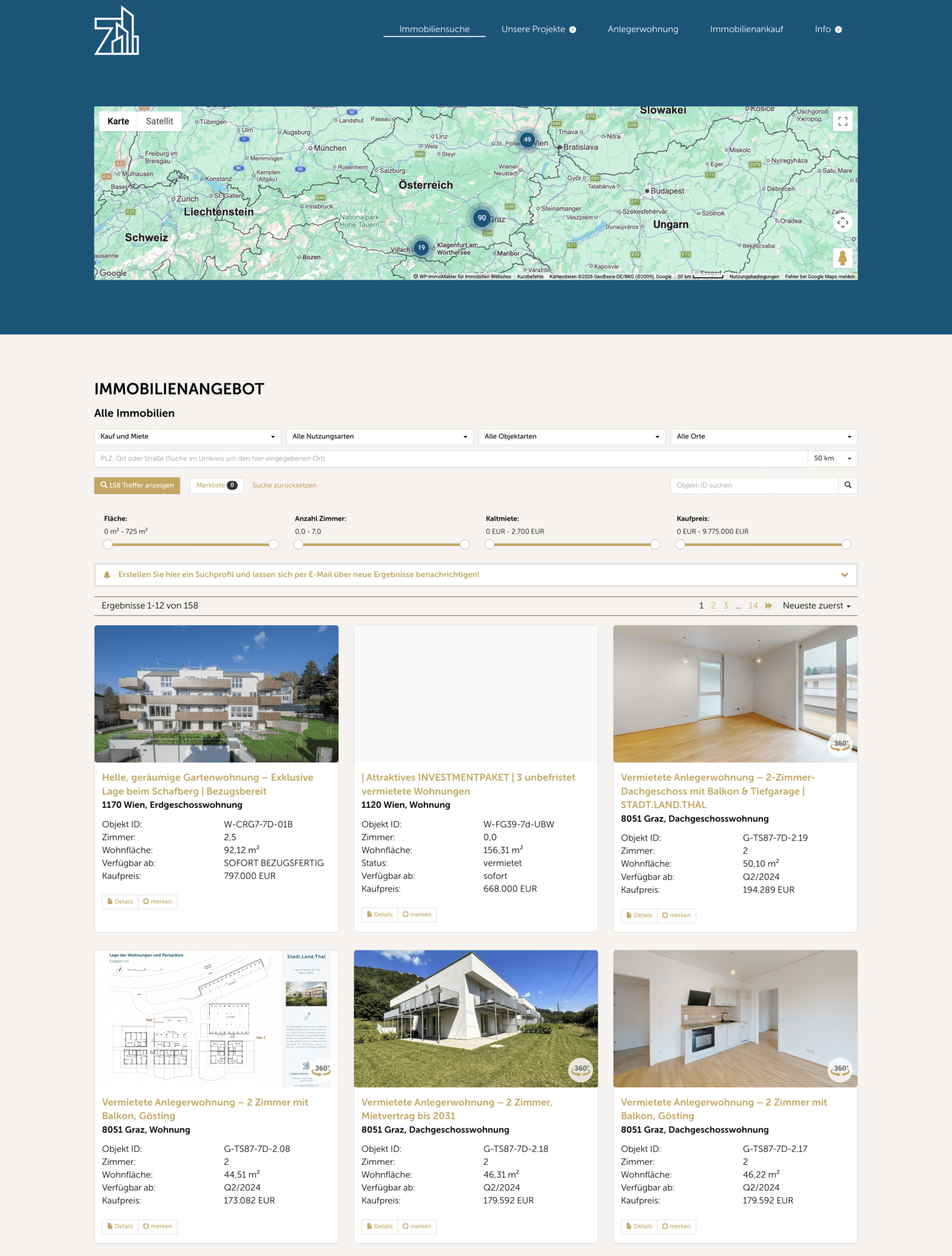
„Immobilienportal mit Kartensuche” / “Übersichtsseite mit interaktiver Umkreissuche, Filtern und Objektliste.”

„Objekt-Exposé einer Kapitalanlage” / “Detailseite mit Renditekennzahlen, Objektbeschreibung und Bildergalerie.”

„Regionales Immobilienportal” / „Übersichtsseite mit Umkreissuche, Objektfiltern und Ergebnisliste.”

„Exposé mit PDF-Download” / „Detailseite mit Objektdaten, Bildergalerie und direktem Exposé-Download.”

Customer testimonials

Your Benefits with WP-ImmoMakler and Bricks Builder

Seamless integration on three levels

All modules appear directly in the Divi Module Panel. No need for shortcodes or workarounds—these are genuine Divi modules with their own settings.

Full Control in the Visual Editor

Design all real estate features directly in Bricks—with a live preview and the familiar Bricks tools.

Dynamic Tags for Maximum Freedom

Insert real estate data into any Bricks element—for completely customizable layouts with no restrictions.

Conditions for Smart Layouts

Automatically show and hide content—based on real estate data, taxonomies, and media availability.

No code required

Every element and every tag can be visually configured—without a single line of PHP or CSS.

Compatible with all Bricks templates

WP-ImmoMakler works with any Bricks template and child theme—there are no design restrictions.

Frequently Asked Questions

  • Do I have to buy Bricks Builder separately?

    Yes, Bricks Builder is a standalone WordPress theme with a built-in page builder and is not included in WP-ImmoMakler. WP-ImmoMakler automatically detects Bricks and activates all real estate elements, dynamic tags, and conditions.

  • Does WP-ImmoMakler work with the latest version of Bricks?

    Yes, we test every version of WP-ImmoMakler with the latest version of Bricks Builder. Our integration uses the official Bricks API, ensuring compatibility even after updates.

  • Which WP-ImmoMakler licenses include the Bricks widgets?

    The Bricks integration is included in all WP-ImmoMakler licenses – BASIC, PLUS, and PREMIUM. Some modules, such as the Virtual Tour, are available starting with the PLUS license.

  • What are dynamic tags, and how do I use them?

    Dynamic tags are dynamic placeholders that you can insert into any Bricks element. Instead of static text, they display, for example, the current purchase price or the living area of a property. This allows you to create completely customizable layouts that automatically populate with the data for each property.

  • Can I show and hide elements based on certain conditions?

    Yes, WP-ImmoMakler's "Bricks Conditions" feature allows you to do exactly that. You can link sections to description texts, PDF availability, or taxonomies such as property type, marketing type, or country.

  • Can I customize the display?

    Of course. All elements offer extensive settings for typography, colors, spacing, borders, and icons—right within the familiar Bricks panels. You can also add your own CSS in Bricks.

  • Is real estate data updated automatically?

    Yes. WP-ImmoMakler supports automatic imports from any real estate brokerage software, based on the OpenImmo standard, ImmoScout24Immowelt and Kyero —the widgets always show the current status.

Ready to create professional real estate websites with Bricks?

Get started with WP-ImmoMakler today and harness the full power of Bricks Builder—with elements, dynamic tags, and conditions for your real estate business.